次に、Visual Studio のデバッガーなどを駆使して、Body の式の種類を調べよう。Body は MemberExpression であることが判る筈だ。
MemberExpression であれば、プロパティの内の Member の Name で名前が取得できる。
実際にメソッドを作ってみるとこんな感じだ:
using System;
using System.Linq.Expressions;
public static class ObjectExtensions
{
// Expression からメンバー名を取得
public static string GetMemberName<ObjectType, MemberType>(this ObjectType @this, Expression<Func<ObjectType, MemberType>> expression)
{
return ((MemberExpression)expression.Body).Member.Name;
}
}
早速使ってみよう。
using System;
class Item
{
    public int Id { get; set; }
}
class Program
{
static void Test()
{
var memberName = new Item().GetMemberName(item => item.Id);
Console.WriteLine(memberName);
}
public static void Main()
{
Test();
}
}
using System;
using System.Linq.Expressions;

public static class ObjectExtensions
{
    // Expression からメンバー名を取得
    public static string GetMemberName<ObjectType, MemberType>(this ObjectType @this, Expression<Func<ObjectType, MemberType>> expression)
    {
        return ((MemberExpression)expression.Body).Member.Name;
    }

    // Expression からメンバー名を取得
    public static string GetMemberName<MemberType>(Expression<Func<MemberType>> expression)
    {
        return ((MemberExpression)expression.Body).Member.Name;
    }
}
Item クラス内部に Test 用のメソッドを追加し、そこから呼んでみる。
using System;

class Item
{
    public int Id { get; set; }

    public void Test()
    {
        var memberName = ObjectExtensions.GetMemberName(() => Id);
        Console.WriteLine(memberName);
    }
}

class Program
{
    static void Test()
    {
        var memberName = new Item().GetMemberName(item => item.Id);
        Console.WriteLine(memberName);
    }

    public static void Main()
    {
        Test();
        new Item().Test();
    }
}
class Super {}
class Sub : Super {}
class Program
{
static void Main()
{
dynamic item = new Dynamic();
item.Property1 = new Super(); // OK
item.Property1 = new Sub(); // OK
item.Property2 = new Sub(); // OK
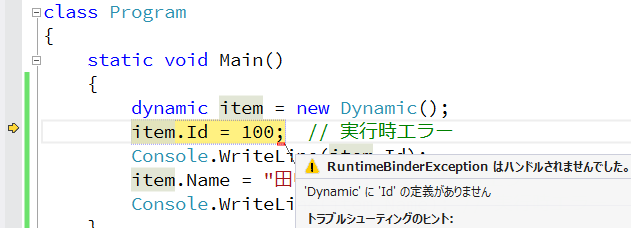
item.Property2 = new Super(); // 実行時エラー (型が違うし、派生クラスでもない)
}
}
using System;
using System.Dynamic;
class Program
{
static void Main()
{
dynamic item = new ExpandoObject();
item.Id = 100; // OK
Console.WriteLine(item.Id); // OK
item.Id = "田中一郎"; // OK
Console.WriteLine(item.Id); // OK
item.Name = "田中一郎"; // OK
Console.WriteLine(item.Name); // OK
//Console.WriteLine(item.Address); // 実行時エラー(設定していないプロパティの値を取得しようとしている)
}
}
例えば、ASP.NET や ASP.NET MVC では、セッション変数を利用する際、以下のように連想配列のように使う。
Session["Id"] = 100;
int? id = Session["Id"] as int?;
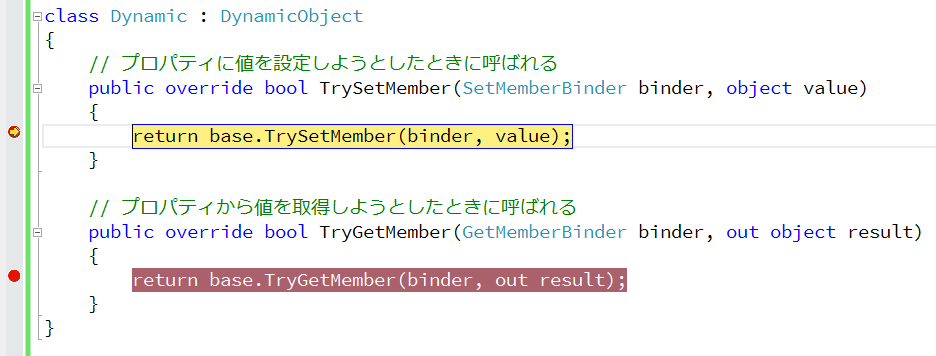
DynamicObject を利用したラッパー クラスを作ってみよう。
例えば、こんな感じだ。
using System.Dynamic;
using System.Web;
public class SessionObject : DynamicObject
{
readonly HttpSessionStateBase session;
public SessionObject(HttpSessionStateBase session)
{
this.session = session;
}
// プロパティに値を設定しようとしたときに呼ばれる
public override bool TrySetMember(SetMemberBinder binder, object value)
{
session[binder.Name] = value;
return true;
}
// プロパティから値を取得しようとしたときに呼ばれる
public override bool TryGetMember(GetMemberBinder binder, out object result)
{
result = session[binder.Name];
return true;
}
}
すると、従来のこんな書き方が、
// ASP.NET MVC の場合の一例 (従来の書き方)
using System.Web;
using System.Web.Mvc;
using System.Web.UI;
public class HomeController : Controller
{
public ActionResult Index()
{
var id = Session["Id"]; // まだ Session["Id"] は無いので、id は null
Session["Id"] = 100; // Session["Id"] に 100 を設定
id = Session["Id"]; // id には 100 が返ってくる
var item = Session["Item"]; // まだ Session["Item"] は無いので、item は null
Session["Item"] = new { Id = 200, Name = "田中一郎" }; // Session["Item"] に匿名型のオブジェクトを設定
id = DataBinder.Eval(Session["Item"], "Id"); // id には 200 が返ってくる
return View();
}
}
SessionObject クラスを使うことによって、こんな書き方になる。
// ASP.NET MVC の場合の一例 (SessionObject クラスを使った場合)
using System.Web;
using System.Web.Mvc;
public class HomeController : Controller
{
dynamic session = null;
public ActionResult Index()
{
session = new SessionObject(Session);
var id = session.Id; // まだ session.Id は無いので、id は null
session.Id = 100; // session.Id に 100 を設定
id = session.Id; // id には 100 が返ってくる
var item = session.Item; // まだ session.Item は無いので、item は null
session.Item = new { Id = 200 }; // session.Item に匿名型のオブジェクトを設定
id = session.Item.Id; // id には 200 が返ってくる
return View();
}
}
dynamic に書けることで、コードがややシンプルになった。
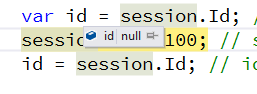
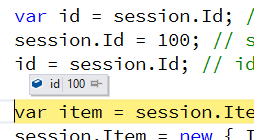
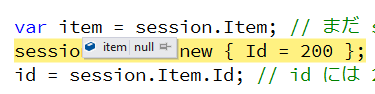
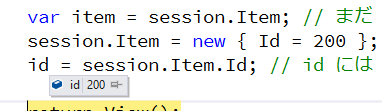
一応、Visual Studio でデバッグ実行し、デバッガーを使って値をチェックしてみると、次のようになった。
1. 「まだ session.Id は無いので、id は null」
2. 「id には 100 が返ってくる」
3. 「まだ session.Item は無いので、item は null」
4. 「id には 200 が返ってくる」
まあ、実用的な意味合いは余りないが、連想配列的な部分には、使える可能性がある、と云う一例だ。
■ ExpandoObject を使った例
次は、ExpandoObject だ。
・ExpandoObject にプロパティっぽいものを追加
前回は、ExpandoObject を使って動的なプロパティっぽいものを実現した。
再度やってみよう。
using System;
using System.Dynamic;
class Program
{
static void Main()
{
dynamic item = new ExpandoObject();
// プロパティっぽいものを追加 その1
item.Id = 10;
Console.WriteLine(item.Id);
}
}
実行結果は次の通り。
10
もうちょっと複雑な例。
using System;
using System.Dynamic;
class Program
{
static void Main()
{
dynamic item = new ExpandoObject();
// プロパティっぽいものを追加 その2
item.SubItem = new { Id = 100, Name = "田中一郎" };
Console.WriteLine(item.SubItem);
Console.WriteLine(item.SubItem.Id);
Console.WriteLine(item.SubItem.Name);
}
}
実行結果は次の通り。
{ Id = 100, Name = 田中一郎 }
100
田中一郎
・ExpandoObject に static メソッドっぽいものを追加
オブジェクトが何でも追加できるのであれば、デリゲートだって追加できる筈だ。
デリゲートが追加できるのであれば、メソッドっぽいものも実現できるのではないか。
試しに、static メソッドっぽいものの追加を試してみよう。
こんな感じ。
using System;
using System.Dynamic;

class Program
{
    static void Main()
    {
        dynamic item = new ExpandoObject();

        // static メソッドっぽいものを追加
        item.SetId = new Action<dynamic, int>((o, value) => { o.Id = value; });
        item.GetId = new Func<dynamic, int>(o => o.Id);

        // 呼んでみる
        item.SetId(item, 30);
        Console.WriteLine(item.GetId(item));
    }
}
実行結果は次の通り。
30
・ExpandoObject に イベントっぽいものを追加
デリゲートが追加できるのであれば、もうちょっとイベントっぽくしてみよう。
こんな感じだ。
using System;
using System.Dynamic;

class Program
{
    static void Main()
    {
        dynamic item = new ExpandoObject();

        // イベントっぽいものを追加

        // 1. 先ず、Update と云う名のイベントっぽいものを用意
        item.Update = null;

        // 2. 次に、Update にイベントハンドラーっぽいものを追加
        item.Update += new Action<dynamic, EventArgs>((sender, _) => Console.WriteLine(sender.Name));

        // 3. そして、SetName と云うメソッドっぽいものを用意して、中で Update と云うイベントっぽいものを起こす
        item.SetName = new Action<dynamic, string>(
            (o, value) => {
                o.Name = value;
                if (o.Update != null)
                    o.Update(o, EventArgs.Empty);
            }
        );

        // 4. では、試してみよう:
        // SetName を呼ぶと Update が起きて Console.WriteLine(sender.Name) されるかな?
        item.SetName(item, "田中次郎");
    }
}
実行結果は次の通り。
田中次郎
イベントっぽい。
・ExpandoObject のメンバーの一覧
ここまでを纏めてみる。最後にメンバーの一覧を取ってみよう。
using System;
using System.Dynamic;

class Program
{
    static void Main()
    {
        dynamic item = new ExpandoObject();

        // プロパティっぽいものを追加 その1
        item.Id = 10;
        Console.WriteLine(item.Id);

        // プロパティっぽいものを追加 その2
        item.SubItem = new { Id = 20, Name = "田中一郎" };
        Console.WriteLine(item.SubItem);
        Console.WriteLine(item.SubItem.Id);
        Console.WriteLine(item.SubItem.Name);

        // static メソッドっぽいものを追加
        item.SetId = new Action<dynamic, int>((o, value) => { o.Id = value; });
        item.GetId = new Func<dynamic, int>(o => o.Id);

        // 呼んでみる
        item.SetId(item, 30);
        Console.WriteLine(item.GetId(item));

        // イベントっぽいものを追加

        // 1. 先ず、Update と云う名のイベントっぽいものを用意
        item.Update = null;

        // 2. 次に、Update にイベントハンドラーっぽいものを追加
        item.Update += new Action<dynamic, EventArgs>((sender, _) => Console.WriteLine(sender.Name));

        // 3. そして、SetName と云うメソッドっぽいものを用意して、中で Update と云うイベントっぽいものを起こす
        item.SetName = new Action<dynamic, string>(
            (o, value) => {
                o.Name = value;
                if (o.Update != null)
                    o.Update(o, EventArgs.Empty);
            }
        );

        // 4. では、試してみよう:
        // SetName を呼ぶと Update が起きて、イベントハンドラーの中で Console.WriteLine(sender.Name) されるかな?
        item.SetName(item, "田中次郎");

        // メンバーの一覧の取得
        Console.WriteLine("\nメンバーの一覧:\n");
        foreach (var member in item)
            Console.WriteLine(member);
    }
}
実行結果は次のようになった。
10
{ Id = 20, Name = 田中一郎 }
20
田中一郎
30
田中次郎

メンバーの一覧:

[Id, 30]
[SubItem, { Id = 20, Name = 田中一郎 }]
[SetId, System.Action`2[System.Object,System.Int32]]
[GetId, System.Func`2[System.Object,System.Int32]]
[Update, System.Action`2[System.Object,System.EventArgs]]
[SetName, System.Action`2[System.Object,System.String]]
[Name, 田中次郎]
public なクラスを持ち、その中には、public な Name プロパティと public な Run() メソッドを持てば良い。
using System;

public class Plugin
{
    public string Name
    {
        get { return "Sample Plugin"; }
    }

    public void Run()
    {
        Console.WriteLine("This is sample plugin!");
    }
}
・プラグインが組み込まれる本体側の実装の例
次はプラグインが組み込まれる本体側だ。
using System;
using System.IO;
using System.Linq;
using System.Reflection;

class Program
{
    // プラグインのフォルダー名
    const string pluginFolderName = "Plugin";
    // 拡張子が dll のものをプラグインと看做す
    const string pluginFileName = "*.dll";

    static void Main()
    {
        // プラグインのフォルダーへのフルパス名を取得し、
        var pluginFolderName = GetPluginFolderName();
        // もしプラグインのフォルダーが在ったら、
        if (Directory.Exists(pluginFolderName))
            // プラグインのフォルダーの各のプラグインのパス名を使って、プラグインを実行
            Directory.GetFiles(pluginFolderName, pluginFileName).ToList().ForEach(Run);
    }

    // プラグインのフォルダーへのフルパス名を取得
    static string GetPluginFolderName()
    {
        // 実行中のこのプログラム自体のアセンブリのパスのフォルダーの下の Plugin フォルダーへのフルパスを取得
        return Path.GetDirectoryName(Assembly.GetExecutingAssembly().Location) + Path.DirectorySeparatorChar + pluginFolderName;
    }

    // プラグインを実行
    static void Run(string pluginPath)
    {
        // アセンブリを読み込み、その中から public な最初のクラスを取り出す
        var pluginType = Assembly.LoadFrom(pluginPath).GetExportedTypes().FirstOrDefault(type => type.IsClass);
        if (pluginType != null)
            // インスタンスを生成し、それをプラグインとして実行
            Run(Activator.CreateInstance(pluginType));
    }

    // プラグインを実行
    static void Run(dynamic plugin)
    {
        Console.WriteLine(plugin.Name); // プラグインの Name を表示し、
        plugin.Run(); // プラグインを Run
    }
}
Sample Plugin
This is sample plugin!
Sample Plugin
This is sample plugin!
両方のプラグインが実行される。
・interface を用いたプラグイン処理の実装の例
因みに、interface を用いた場合の例だと次のようになる。
・interface を用いたプラグイン処理の実装の例 - interface
先ず interface をクラス ライブラリとして準備する。
public interface IPlugin
{
    string Name { get; }
    void Run();
}
・interface を用いたプラグイン処理の実装の例 - プラグイン側
プラグイン側で interface のライブラリを参照し、クラスで IPlugin を実装する。
public class Plugin : IPlugin
{
    public string Name
    {
        get { return "Sample Plugin"; }
    }

    public void Run()
    {
        Console.WriteLine("This is sample plugin!");
    }
}
・interface を用いたプラグイン処理の実装の例 - プラグインが組み込まれる本体側
本体側でも interface のライブラリを参照する。
プラグイン側と本体側が同じ interface に依存することになる。
interface を持ったクラスを探して、interface によって Name や Run() にアクセスする。
先の例と違って、dynamic は使わない。
using System;
using System.IO;
using System.Linq;
using System.Reflection;

class Program
{
    // プラグインのフォルダー名
    const string pluginFolderName = "Plugin";
    // 拡張子が dll のものをプラグインと看做す
    const string pluginFileName = "*.dll";

    static void Main()
    {
        // プラグインのフォルダーへのフルパス名を取得し、
        var pluginFolderName = GetPluginFolderName();
        // もしプラグインのフォルダーが在ったら、
        if (Directory.Exists(pluginFolderName))
            // プラグインのフォルダーの各のプラグインのパス名を使って、プラグインを実行
            Directory.GetFiles(pluginFolderName, pluginFileName).ToList().ForEach(Run);
    }

    // プラグインのフォルダーへのフルパス名を取得
    static string GetPluginFolderName()
    {
        // 実行中のこのプログラム自体のアセンブリのパスのフォルダーの下の Plugin フォルダーへのフルパスを取得
        return Path.GetDirectoryName(Assembly.GetExecutingAssembly().Location) + Path.DirectorySeparatorChar + pluginFolderName;
    }

    // プラグインを実行
    static void Run(string pluginPath)
    {
        // アセンブリを読み込み、その中から public で IPlugin インタフェイスを持った最初のクラスを取り出す
        var pluginType = Assembly.LoadFrom(pluginPath).GetExportedTypes().FirstOrDefault(type => type.IsClass && typeof(IPlugin).IsAssignableFrom(type));
        if (pluginType != null)
            // インスタンスを生成し、それをプラグインとして実行
            Run((IPlugin)Activator.CreateInstance(pluginType));
    }

    // プラグインを実行
    static void Run(IPlugin plugin)
    {
        Console.WriteLine(plugin.Name); // プラグインの Name を表示し、
        plugin.Run(); // プラグインを Run
    }
}
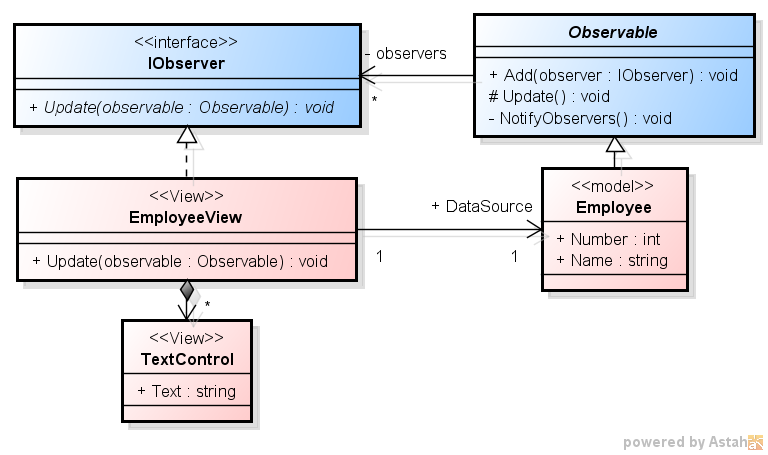
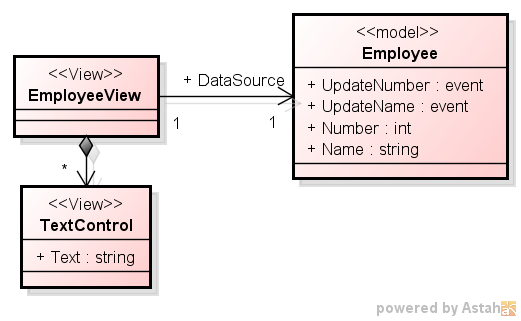
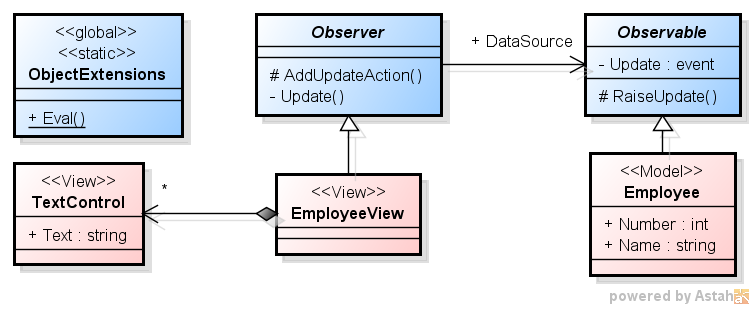
続いて、アプリケーション部。ここには、Employee と EmployeeView、TextControl、そして Main を含んだクラス Program がある。
// C# による Oberver パターンの実装 その1
using System;

// アプリケーション部

// Model
class Employee : Observable
{
    int number = 0;
    string name = string.Empty;

    public int Number
    {
        get { return number; }
        set
        {
            if (value != number) {
                number = value;
                Update();
            }
        }
    }

    public string Name
    {
        get { return name; }
        set
        {
            if (value != name) {
                name = value;
                Update();
            }
        }
    }
}

class TextControl // テキスト表示用のUI部品 (ダミー)
{
    public string Text
    {
        set { Console.WriteLine("TextControl is updated: {0}", value); }
    }
}

class EmployeeView : IObserver // Employee 用の View
{
    TextControl numberTextControl = new TextControl(); // Number 表示用
    TextControl nameTextControl = new TextControl(); // Name 表示用

    public Employee DataSource
    {
        set { value.Add(this); }
    }

    public void Update(Observable observable) // データソースのどのプロパティが更新されてもここに来る
    {
        var employee = observable as Employee;
        if (employee != null) {
            numberTextControl.Text = employee.Number.ToString();
            nameTextControl.Text = employee.Name;
        }
    }
}

class Program
{
    static void Main()
    {
        var employee = new Employee(); // Model, Observable
        var employeeView = new EmployeeView(); // View, Observer

        employeeView.DataSource = employee; // データバインド
        employee.Number = 100; // Number を変更。employeeView に反映されたかな?
        employee.Name = "福井太郎"; // Name を変更。employeeView に反映されたかな?
    }
}
・実行結果
実行してみると、次のようになる。
TextControl is updated: 100
TextControl is updated:
TextControl is updated: 100
TextControl is updated: 福井太郎
Employee の Number や Name が更新される度に、EmployeeView の Update が呼ばれ、二つの TextControl の表示が更新される。
Number の更新でも Name の更新でも同じ Update が呼ばれている。 ここは、出来ればそれぞれ処理したいところだ。
EmployeeView は、表示部として TextControl を二つ持っていて、それぞれに DataSource の Number と Name を表示する。
・実装 1
それでは、実装していこう (一部エラー処理を省略)。
// C# による Oberver パターンの実装 - event による実装 1
using System;
using System.Collections.Generic;

// アプリケーション部

// Model: 更新を監視される側
class Employee
{
    public event Action<Employee> Update; // 更新イベント

    int number = 0;
    string name = string.Empty;

    public int Number
    {
        get { return number; }
        set {
            if (value != number) {
                number = value;
                if (Update != null)
                    Update(this);
            }
        }
    }

    public string Name
    {
        get { return name; }
        set {
            if (value != name) {
                name = value;
                if (Update != null)
                    Update(this);
            }
        }
    }
}

class TextControl // テキスト表示用のUI部品 (ダミー)
{
    public string Text {
        set { Console.WriteLine("TextControl is updated: {0}", value); }
    }
}

class EmployeeView // Employee 用の View: 更新を監視する側
{
    TextControl numberTextControl = new TextControl(); // Number 表示用
    TextControl nameTextControl = new TextControl(); // Name 表示用

    public Employee DataSource
    {
        set {
            value.Update += Update; // データソースの更新イベントにハンドラを設定
        }
    }

    void Update(Employee employee) // データソースのどのプロパティが更新されてもここに来る
    {
        numberTextControl.Text = employee.Number.ToString();
        nameTextControl.Text = employee.Name;
    }
}

class Program
{
    static void Main()
    {
        var employee = new Employee(); // Model, Observable
        var employeeView = new EmployeeView(); // View, Observer

        employeeView.DataSource = employee; // データバインド
        employee.Number = 100; // Number を変更。employeeView に反映されたかな?
        employee.Name = "福井太郎"; // Name を変更。employeeView に反映されたかな?
    }
}
・実行結果
実行してみると、次のようになる。
前回と同じ結果だ。
TextControl is updated: 100
TextControl is updated:
TextControl is updated: 100
TextControl is updated: 福井太郎
今回も矢張り、Employee の Number や Name が更新される度に、EmployeeView の Update が呼ばれ、二つの TextControl の表示が更新される。
■ C# での Observer パターンの実装 2 - event による実装 2
上では、Number と Name のどちらが更新されても両方の TextControl が更新されている。
これは、Number と Name のどちらが更新されても同じイベントが起きるようになっている為だ。
// C# による Oberver パターンの実装 - event による実装 2
using System;
using System.Collections.Generic;

// アプリケーション部

// Model: 更新を監視される側
class Employee
{
    public event Action<Employee> UpdateNumber; // Number 更新イベント
    public event Action<Employee> UpdateName; // Name 更新イベント

    int number = 0;
    string name = string.Empty;

    public int Number
    {
        get { return number; }
        set {
            if (value != number) {
                number = value;
                if (UpdateNumber != null)
                    UpdateNumber(this);
            }
        }
    }

    public string Name
    {
        get { return name; }
        set {
            if (value != name) {
                name = value;
                if (UpdateName != null)
                    UpdateName(this);
            }
        }
    }
}

class TextControl // テキスト表示用のUI部品 (ダミー)
{
    public string Text {
        set { Console.WriteLine("TextControl is updated: {0}", value); }
    }
}

class EmployeeView // Employee 用の View: 更新を監視する側
{
    TextControl numberTextControl = new TextControl(); // Number 表示用
    TextControl nameTextControl = new TextControl(); // Name 表示用

    public Employee DataSource
    {
        set {
            // それぞれの更新イベントでそれぞれ TextControl を更新
            value.UpdateNumber += employee => numberTextControl.Text = employee.Number.ToString();
            value.UpdateName += employee => nameTextControl.Text = employee.Name;
        }
    }
}

class Program
{
    static void Main()
    {
        var employee = new Employee(); // Model, Observable
        var employeeView = new EmployeeView(); // View, Observer

        employeeView.DataSource = employee; // データバインド
        employee.Number = 100; // Number を変更。employeeView に反映されたかな?
        employee.Name = "福井太郎"; // Name を変更。employeeView に反映されたかな?
    }
}
・実行結果
実行してみると、次のようになる。
Number と Name それぞれの更新で、それぞれの TextControl が更新されている。
TextControl is updated: 100
TextControl is updated: 福井太郎
// C# による Oberver パターンの実装 その3
using System;
using System.Collections.Generic;

// フレームワーク部

public static class ObjectExtensions
{
    // オブジェクトの指定された名前のプロパティの値を取得
    public static object Eval(this object item, string propertyName)
    {
        var propertyInfo = item.GetType().GetProperty(propertyName);
        return propertyInfo == null ? null : propertyInfo.GetValue(item, null);
    }
}

abstract class Observable // 更新を監視される側
{
    public event Action<string> Update;

    protected void RaiseUpdate(string propertyName)
    {
        if (Update != null)
            Update(propertyName);
    }
}

abstract class Observer // 更新を監視する側
{
    Dictionary<string, Action<object>> updateExpressions = new Dictionary<string, Action<object>>();
    Observable dataSource = null;

    public Observable DataSource
    {
        set {
            dataSource = value;
            value.Update += Update;
        }
    }

    protected void AddUpdateAction(string propertyName, Action<object> updateAction)
    {
        updateExpressions[propertyName] = updateAction;
    }

    void Update(string propertyName)
    {
        Action<object> updateAction;
        if (updateExpressions.TryGetValue(propertyName, out updateAction))
            updateAction(dataSource.Eval(propertyName));
    }
}
・アプリケーション部の実装
続いて、アプリケーション部。Employee と EmployeeView、TextControl、そして Main を含んだクラス Program だ。
// C# による Oberver パターンの実装 その3
using System;

// アプリケーション部

// Model
class Employee : Observable
{
    int number = 0;
    string name = string.Empty;

    public int Number
    {
        get { return number; }
        set {
            if (value != number) {
                number = value;
                RaiseUpdate("Number");
            }
        }
    }

    public string Name
    {
        get { return name; }
        set {
            if (value != name) {
                name = value;
                RaiseUpdate("Name");
            }
        }
    }
}

class TextControl // テキスト表示用のUI部品 (ダミー)
{
    public string Text
    {
        set { Console.WriteLine("TextControl is updated: {0}", value); }
    }
}

class EmployeeView : Observer // Employee 用の View
{
    TextControl numberTextControl = new TextControl(); // Number 表示用
    TextControl nameTextControl = new TextControl(); // Name 表示用

    public EmployeeView()
    {
        AddUpdateAction("Number", number => numberTextControl.Text = ((int)number).ToString());
        AddUpdateAction("Name", name => nameTextControl.Text = (string)name);
    }
}

class Program
{
    static void Main()
    {
        var employee = new Employee(); // Model, Observable
        var employeeView = new EmployeeView(); // View, Observer

        employeeView.DataSource = employee; // データバインド
        employee.Number = 100; // Number を変更。employeeView に反映されたかな?
        employee.Name = "福井太郎"; // Name を変更。employeeView に反映されたかな?
    }
}
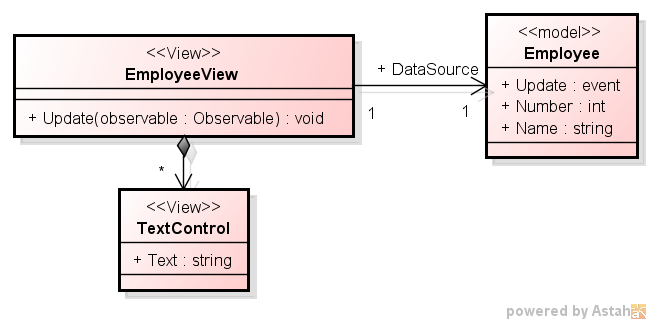
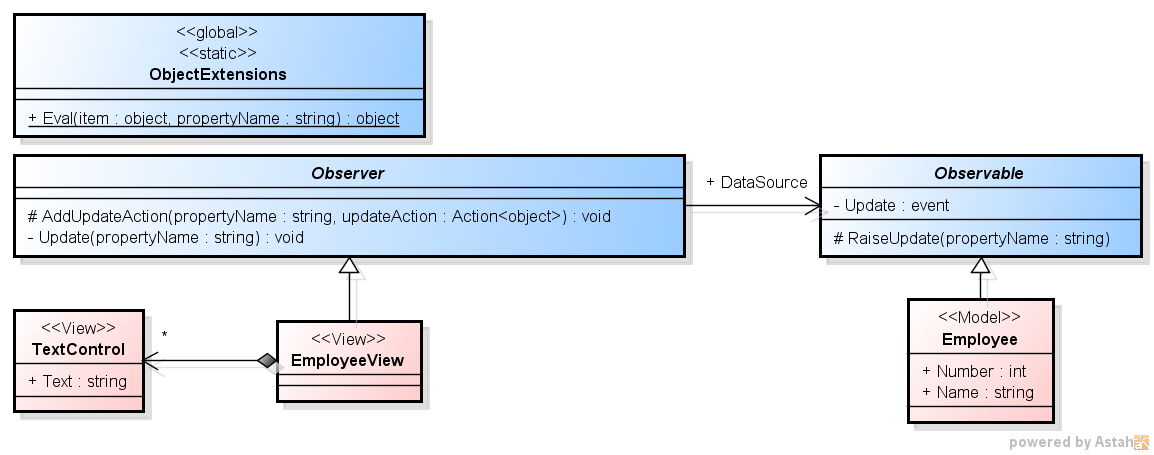
・クラス図 2
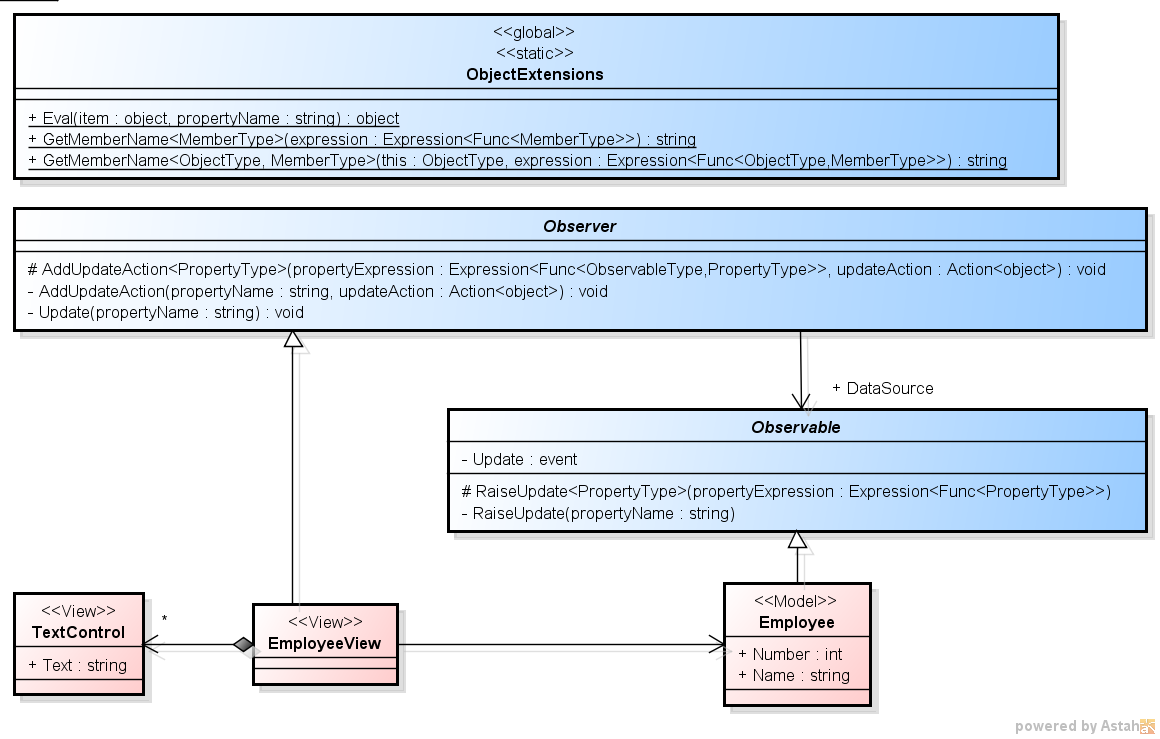
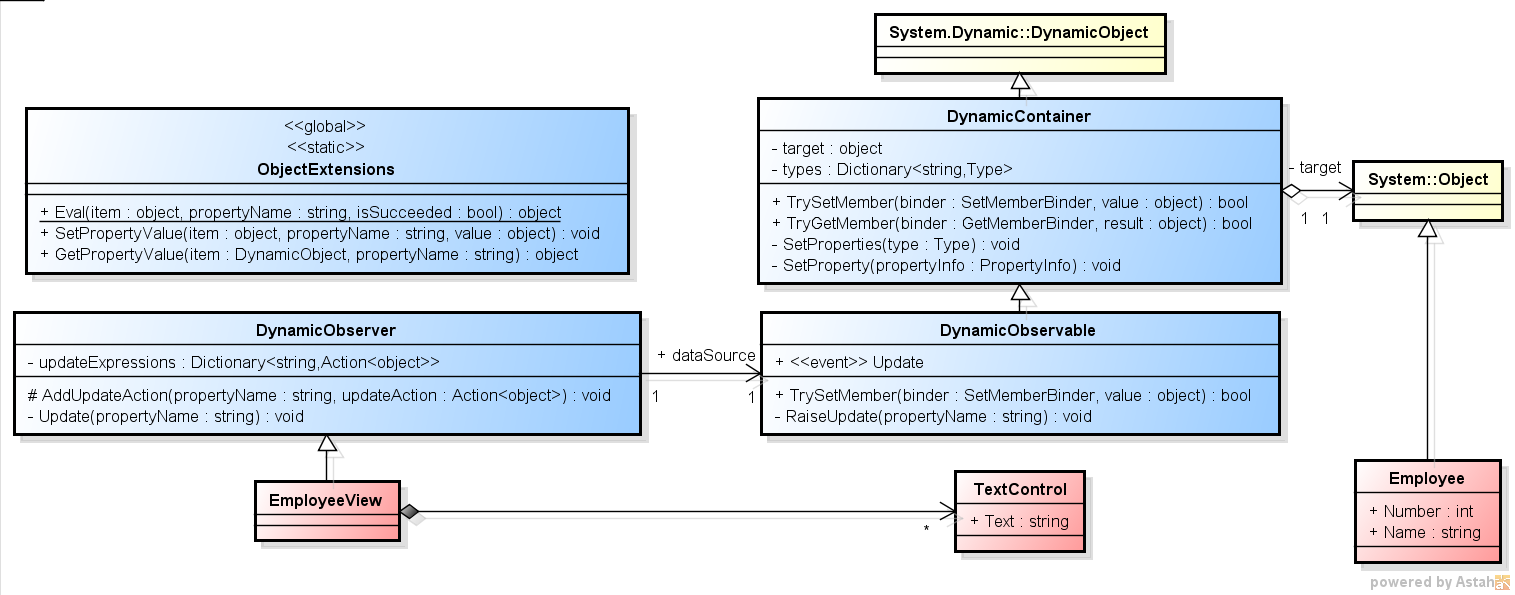
先のクラス図に、引数と戻り値の型を書き加えたものを示す。
「C# での Observer パターンの実装 3」のクラス図
・実行結果
実行してみると、次のようになる。
前回の二つ目と同じ結果だ。
TextControl is updated: 100
TextControl is updated: 福井太郎
Number と Name それぞれの更新で、それぞれの TextControl が更新されている。
// C# による Oberver パターンの実装 その3 (前回)
using System;

// アプリケーション部

// Model
class Employee : Observable
{
    int number = 0;
    string name = string.Empty;

    public int Number
    {
        get { return number; }
        set {
            if (value != number) {
                number = value;
                RaiseUpdate("Number"); // ☆ 文字列でプロパティを指定
            }
        }
    }

    public string Name
    {
        get { return name; }
        set {
            if (value != name) {
                name = value;
                RaiseUpdate("Name"); // ☆ 文字列でプロパティを指定
            }
        }
    }
}

class TextControl // テキスト表示用のUI部品 (ダミー)
{
    public string Text
    {
        set { Console.WriteLine("TextControl is updated: {0}", value); }
    }
}

class EmployeeView : Observer // Employee 用の View
{
    TextControl numberTextControl = new TextControl(); // Number 表示用
    TextControl nameTextControl = new TextControl(); // Name 表示用

    public EmployeeView()
    {
        // ☆ AddUpdateAction の第一引数で文字列でプロパティを指定
        AddUpdateAction("Number", number => numberTextControl.Text = ((int)number).ToString());
        AddUpdateAction("Name", name => nameTextControl.Text = (string)name);
    }
}
これが、こうなる。
// C# による Oberver パターンの実装 その4
using System;

// アプリケーション部

// Model
class Employee : Observable
{
    int number = 0;
    string name = string.Empty;

    public int Number
    {
        get { return number; }
        set {
            if (value != number) {
                number = value;
                RaiseUpdate(() => Number); // ☆ RaiseUpdate がタイプセーフに
            }
        }
    }

    public string Name
    {
        get { return name; }
        set {
            if (value != name) {
                name = value;
                RaiseUpdate(() => Name); // ☆ RaiseUpdate がタイプセーフに
            }
        }
    }
}

class TextControl // テキスト表示用のUI部品 (ダミー)
{
    public string Text
    {
        set { Console.WriteLine("TextControl is updated: {0}", value); }
    }
}

class EmployeeView : Observer<Employee> // Employee 用の View
{
    TextControl numberTextControl = new TextControl(); // Number 表示用
    TextControl nameTextControl = new TextControl(); // Name 表示用

    public EmployeeView()
    {
        // ☆ AddUpdateAction の第一引数がタイプセーフに
        AddUpdateAction(employee => employee.Number, number => numberTextControl.Text = ((int)number).ToString());
        AddUpdateAction(employee => employee.Name, name => nameTextControl.Text = (string)name);
    }
}
文字列でプロパティを指定している箇所が消えた。
・Main を含んだクラス Program
Main を含んだクラス Program は、変更なし。
class Program
{
    static void Main()
    {
        var employee = new Employee(); // Model, Observable
        var employeeView = new EmployeeView(); // View, Observer

        employeeView.DataSource = employee; // データバインド
        employee.Number = 100; // Number を変更。employeeView に反映されたかな?
        employee.Name = "福井太郎"; // Name を変更。employeeView に反映されたかな?
    }
}
・実行結果
実行結果も変わらない。
TextControl is updated: 100
TextControl is updated: 福井太郎
矢張り、Number と Name それぞれの更新で、それぞれの TextControl が更新されている。
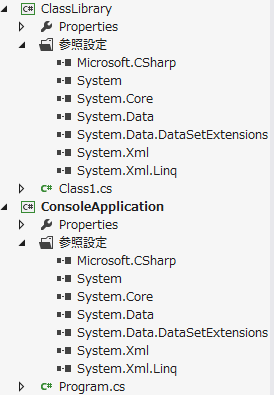
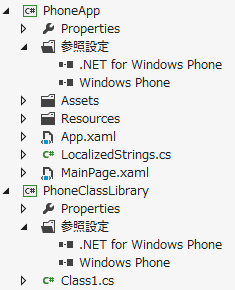
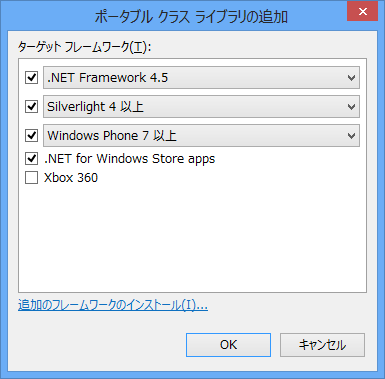
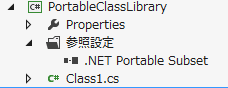
Windows Phone アプリと Windows Phone クラス ライブラリで参照している .NET
「.NET for Windows Phone」となっている。
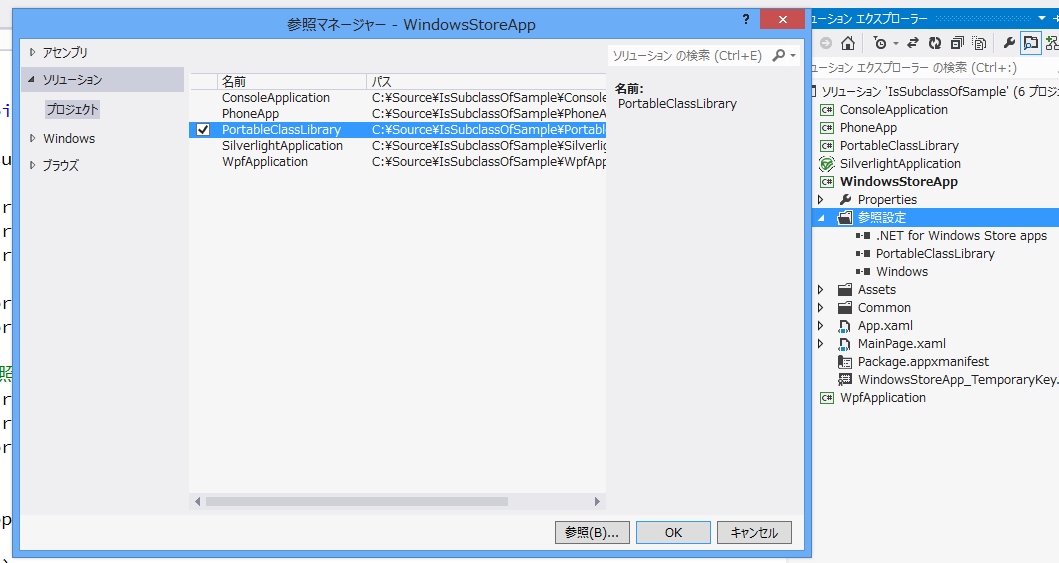
・Windows ストア アプリの場合
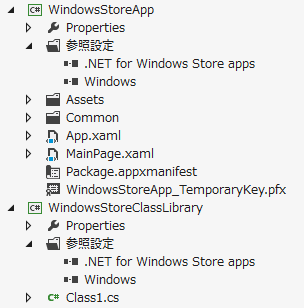
Windows ストア アプリとWindows ストア クラス ライブラリで参照している .NET
こちらでは、「.NET for Windows Store apps」となっているのが判る。
■ IsSubclassOf 等による検証
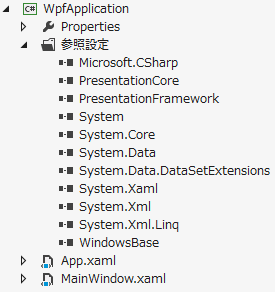
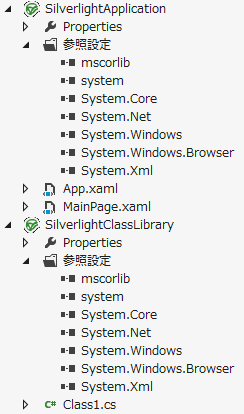
つまり、これらで参照している .NET は、全てが共通な訳ではない。
コア部分は共通なのだろうか?
私が試してみたところ、System 名前空間の付近でも微妙な違いがあるようだ。
今回は、以下のようなコードを用いて、この辺りを検証してみたい。
// コンソール アプリケーション
// .NET Framework 4.5

using System.Reflection; // ※ GetRuntimeProperties に必要

class Program
{
    class Super { }
    class Sub : Super
    {
        public int Number { get; set; }
        public string Name { get; set; }
    }

    static void Test()
    {
        var sub = new Sub();

        bool result1 = sub.GetType().IsSubclassOf(typeof(Super));
        bool result2 = sub.GetType().IsAssignableFrom(typeof(Super));
        bool result3 = sub is Super;

        var properties1 = typeof(Sub).GetProperties();
        var properties2 = typeof(Sub).GetRuntimeProperties();
    }

    static void Main()
    {
        Test();
    }
}
これはコンソール アプリケーションのソースコードだが、正常にコンパイルでき、正常に動作する。
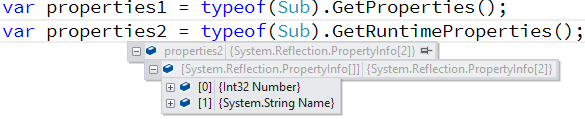
Visual Studio のデバッガーで値を確認してみると、次のようになった。
コンソール アプリケーションの場合の実行結果 1
コンソール アプリケーションの場合の実行結果 2
コンソール アプリケーションの場合の実行結果 3
・WPF と Silverlight の場合
同様のことを、WPF と Silverlight の場合で試してみると次のようになる。
先ず WPF から。
// WPF アプリケーション
// .NET Framework 4.5

using System.Windows;

namespace WpfApplication
{
    using System.Reflection; // ※ GetRuntimeProperties に必要

    public partial class App : Application
    {
        class Super { }
        class Sub : Super
        {
            public int Number { get; set; }
            public string Name { get; set; }
        }

        static void Test()
        {
            var sub = new Sub();

            bool result1 = sub.GetType().IsSubclassOf(typeof(Super)); // ○ OK
            bool result2 = sub.GetType().IsAssignableFrom(typeof(Super)); // ○ OK
            bool result3 = sub is Super; // ○ OK

            var properties1 = typeof(Sub).GetProperties(); // ○ OK
            var properties2 = typeof(Sub).GetRuntimeProperties(); // ○ OK
        }

        public App()
        {
            Test();
        }
    }
}
// Silverlight 5

using System;
using System.Windows;

namespace SilverlightApplication
{
    using System.Reflection; // ※ GetRuntimeProperties に必要

    public partial class App : Application
    {
        class Super { }
        class Sub : Super
        {
            public int Number { get; set; }
            public string Name { get; set; }
        }

        static void Test()
        {
            var sub = new Sub();

            bool result1 = sub.GetType().IsSubclassOf(typeof(Super)); // ○ OK
            bool result2 = sub.GetType().IsAssignableFrom(typeof(Super)); // ○ OK
            bool result3 = sub is Super; // ○ OK

            var properties1 = typeof(Sub).GetProperties(); // ○ OK
            var properties2 = typeof(Sub).GetRuntimeProperties(); // × コンパイル エラー
        }

        public App()
        {
            Test();

            // ... 以下省略 ...
        }

        // ... 以下省略 ...
    }
}
// Windows Phone OS 8.0

using Microsoft.Phone.Controls;
using Microsoft.Phone.Shell;
using PhoneApp.Resources;
using System.Diagnostics;
using System.Windows;
using System.Windows.Markup;
using System.Windows.Navigation;

namespace PhoneApp
{
    using System;
    using System.Reflection; // ※ GetRuntimeProperties に必要

    public partial class App : Application
    {
        class Super { }
        class Sub : Super
        {
            public int Number { get; set; }
            public string Name { get; set; }
        }

        static void Test()
        {
            var sub = new Sub();

            bool result1 = sub.GetType().IsSubclassOf(typeof(Super)); // ○ OK
            bool result2 = sub.GetType().IsAssignableFrom(typeof(Super)); // ○ OK
            bool result3 = sub is Super; // ○ OK

            var properties1 = typeof(Sub).GetProperties(); // ○ OK
            var properties2 = typeof(Sub).GetRuntimeProperties(); // ○ OK
        }

        public App()
        {
            Test();

            // ... 以下省略 ...
        }

        // ... 以下省略 ...
    }
}
全て問題なくコンパイル・実行できる。
・Windows ストア アプリの場合
さて、Windows ストア アプリではどうなるだろうか。
こうなるのだ。
// Windows ストア アプリ

using System;
using Windows.ApplicationModel;
using Windows.ApplicationModel.Activation;
using Windows.UI.Xaml;
using Windows.UI.Xaml.Controls;

namespace WindowsStoreApp
{
    using System.Reflection; // ※ GetRuntimeProperties に必要

    sealed partial class App : Application
    {
        class Super { }
        class Sub : Super
        {
            public int Number { get; set; }
            public string Name { get; set; }
        }

        static void Test()
        {
            var sub = new Sub();

            bool result1 = sub.GetType().IsSubclassOf(typeof(Super)); // × コンパイル エラー
            bool result2 = sub.GetType().IsAssignableFrom(typeof(Super)); // × コンパイル エラー
            bool result3 = sub is Super; // ○ OK

            var properties1 = typeof(Sub).GetProperties(); // × コンパイル エラー
            var properties2 = typeof(Sub).GetRuntimeProperties(); // ○ OK
        }

        public App()
        {
            Test();

            // ... 以下省略 ...

            this.InitializeComponent();
            this.Suspending += OnSuspending;
        }

        // ... 以下省略 ...
    }
}
なんと、System 名前空間の Type 型が IsSubclassOf や IsAssignableFrom を持っていないようだ。
実際に調べてみると、Windows ストア アプリが参照している System 名前空間の Type 型は以下の public メンバーを持っている。
// Windows ストア アプリが参照している System 名前空間の Type 型
// アセンブリ System.Runtime.dll, v4.0.0.0
// Framework\.NETCore\v4.5\System.Runtime.dll
namespace System
{
    public abstract class Type
    {
        public static readonly object Missing;

        public abstract string AssemblyQualifiedName { get; }
        public abstract Type DeclaringType { get; }
        public abstract string FullName { get; }
        public abstract int GenericParameterPosition { get; }
        public abstract Type[] GenericTypeArguments { get; }
        public bool HasElementType { get; }
        public bool IsArray { get; }
        public bool IsByRef { get; }
        public abstract bool IsConstructedGenericType { get; }
        public abstract bool IsGenericParameter { get; }
        public bool IsNested { get; }
        public bool IsPointer { get; }

        public abstract string Name { get; }
        public abstract string Namespace { get; }
        public virtual RuntimeTypeHandle TypeHandle { get; }

        public override bool Equals(object o);
        public bool Equals(Type o);
        public abstract int GetArrayRank();
        public abstract Type GetElementType();
        public abstract Type GetGenericTypeDefinition();
        public override int GetHashCode();
        public static Type GetType(string typeName);
        public static Type GetType(string typeName, bool throwOnError);
        public static Type GetTypeFromHandle(RuntimeTypeHandle handle);
        public abstract Type MakeArrayType();
        public abstract Type MakeArrayType(int rank);
        public abstract Type MakeByRefType();
        public abstract Type MakeGenericType(params Type[] typeArguments);
        public abstract Type MakePointerType();
        public override string ToString();
    }
}
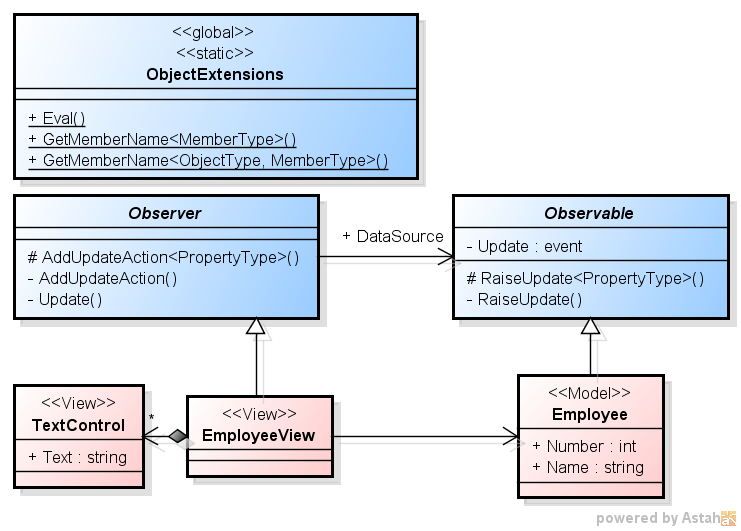
Caller Info 属性の一つである [CallerMemberName] を付けておくと、呼び出し元のメンバー名 (この場合はプロパティ名) がコンパイラーによって渡されてくる。
これを利用してみよう。
・フレームワーク部 - Observable (今回)
// C# による Oberver パターンの実装 その5
using System;
using System.Runtime.CompilerServices; // ☆ [CallerMemberName] の為に必要

abstract class Observable // 更新を監視される側
{
    public event Action<string> Update;

    protected void RaiseUpdate([CallerMemberName] string propertyName = "") // ☆ Caller Info 属性を利用
    {
        if (Update != null)
            Update(propertyName);
    }
}
すると、Observable の派生クラスで、プロパティ名を渡さなくて良くなる。
前回の Employee はこうだった。
・アプリケーション部 - Employee と EmployeeView (前回)
// C# による Oberver パターンの実装 その4
using System;

// アプリケーション部

// Model
class Employee : Observable
{
    int number = 0;
    string name = string.Empty;

    public int Number
    {
        get { return number; }
        set {
            if (value != number) {
                number = value;
                RaiseUpdate(() => Number); // ☆ RaiseUpdate がタイプセーフに
            }
        }
    }

    public string Name
    {
        get { return name; }
        set {
            if (value != name) {
                name = value;
                RaiseUpdate(() => Name); // ☆ RaiseUpdate がタイプセーフに
            }
        }
    }
}
これがこうなる。
・アプリケーション部 - Employee と EmployeeView (今回)
// C# による Oberver パターンの実装 その5
using System;

// アプリケーション部

// Model
class Employee : Observable
{
    int number = 0;
    string name = string.Empty;

    public int Number
    {
        get { return number; }
        set {
            if (value != number) {
                number = value;
                RaiseUpdate(); // ☆ RaiseUpdate の中で文字列でプロパティを渡す必要がなくなった
            }
        }
    }

    public string Name
    {
        get { return name; }
        set {
            if (value != name) {
                name = value;
                RaiseUpdate(); // ☆ RaiseUpdate の中で文字列でプロパティを渡す必要がなくなった
            }
        }
    }
}
// C# による Oberver パターンの実装 その5
using System;
using System.Collections.Generic;
using System.Linq.Expressions;
using System.Runtime.CompilerServices; // ☆ [CallerMemberName] の為に必要

// フレームワーク部

public static class ObjectExtensions
{
    // オブジェクトの指定された名前のプロパティの値を取得
    public static object Eval(this object item, string propertyName)
    {
        var propertyInfo = item.GetType().GetProperty(propertyName);
        return propertyInfo == null ? null : propertyInfo.GetValue(item, null);
    }

    // Expression からメンバー名を取得
    public static string GetMemberName<ObjectType, MemberType>(this ObjectType @this, Expression<Func<ObjectType, MemberType>> expression)
    {
        return ((MemberExpression)expression.Body).Member.Name;
    }
}

abstract class Observable // 更新を監視される側
{
    public event Action<string> Update;

    protected void RaiseUpdate([CallerMemberName] string propertyName = "") // ☆ Caller Info 属性を利用
    {
        if (Update != null)
            Update(propertyName);
    }
}

abstract class Observer<ObservableType> where ObservableType : Observable // 更新を監視する側
{
    Dictionary<string, Action<object>> updateExpressions = new Dictionary<string, Action<object>>();
    ObservableType dataSource = null;

    public ObservableType DataSource
    {
        set {
            dataSource = value;
            value.Update += Update;
        }
    }

    protected void AddUpdateAction<PropertyType>(Expression<Func<ObservableType, PropertyType>> propertyExpression, Action<object> updateAction)
    {
        AddUpdateAction(dataSource.GetMemberName(propertyExpression), updateAction);
    }

    void AddUpdateAction(string propertyName, Action<object> updateAction)
    {
        updateExpressions[propertyName] = updateAction;
    }

    void Update(string propertyName)
    {
        Action<object> updateAction;
        if (updateExpressions.TryGetValue(propertyName, out updateAction))
            updateAction(dataSource.Eval(propertyName));
    }
}
// C# による Oberver パターンの実装 その5
using System;

// アプリケーション部

// Model
class Employee : Observable
{
    int number = 0;
    string name = string.Empty;

    public int Number
    {
        get { return number; }
        set {
            if (value != number) {
                number = value;
                RaiseUpdate(); // ☆ RaiseUpdate の中で文字列でプロパティを渡す必要がなくなった
            }
        }
    }

    public string Name
    {
        get { return name; }
        set {
            if (value != name) {
                name = value;
                RaiseUpdate(); // ☆ RaiseUpdate の中で文字列でプロパティを渡す必要がなくなった
            }
        }
    }
}

class TextControl // テキスト表示用のUI部品 (ダミー)
{
    public string Text
    {
        set { Console.WriteLine("TextControl is updated: {0}", value); }
    }
}

class EmployeeView : Observer<Employee> // Employee 用の View
{
    TextControl numberTextControl = new TextControl(); // Number 表示用
    TextControl nameTextControl = new TextControl(); // Name 表示用

    public EmployeeView()
    {
        AddUpdateAction(employee => employee.Number, number => numberTextControl.Text = ((int)number).ToString());
        AddUpdateAction(employee => employee.Name, name => nameTextControl.Text = (string)name);
    }
}

class Program
{
    static void Main()
    {
        var employee = new Employee(); // Model, Observable
        var employeeView = new EmployeeView(); // View, Observer

        employeeView.DataSource = employee; // データバインド
        employee.Number = 100; // Number を変更。employeeView に反映されたかな?
        employee.Name = "福井太郎"; // Name を変更。employeeView に反映されたかな?
    }
}
・実行結果
勿論、実行結果に変わりはない。
TextControl is updated: 100
TextControl is updated: 福井太郎
■ 今回のまとめと次回予告
今回は、前回のものに対して補足を行った。
Caller Info を使うことで、アプリケーション部でプロパティを指定する箇所が更にシンプルになった。
プラグインは、必ず string Name() と云う名称を返す public なメソッドを持っている。
プラグインは、必ず void Run() と云う public なメソッドによって動作する。
■ プラグイン側の実装の例
では、プラグイン側から実装してみよう。
今回用意するのは、以下の三種類だ。
・DLL プラグインの実装の例
DLL プラグインは、クラスライブラリとして作成し、ビルドして "Test.dll" とする。
public なクラスを持ち、その中には、public な Name() メソッドと public な Run() メソッドを持つ。
// DLL プラグイン (クラスライブラリとして作成し、ビルドして "Test.dll" に)
using System;

public class Plugin
{
    public string Name()
    {
        return "DLL Plugin";
    }

    public void Run()
    {
        Console.WriteLine("DLL Plugin is running!");
    }
}
・C# プラグインの実装の例
C# プラグインは、一つの cs ファイルだ。"Test.cs" として保存する。
public なクラスを持ち、その中には、public な Name() メソッドと public な Run() メソッドを持つ。
// C# プラグイン ("Test.cs" として保存)
using System;

public class Plugin
{
    public string Name()
    {
        return "C# Plugin";
    }

    public void Run()
    {
        Console.WriteLine("C# Plugin is running!");
    }
}
・Python プラグインの実装の例
Python プラグインは、一つの py ファイルだ。"Test.py" として保存する。
Name() メソッドと Run() メソッドを持つ。
# Python Plugnin (Save as "Test.py".)
def Name():
  return "Python plugin"

def Run():
  print "Python plugin is running!\n"
using System;

// アプリケーション部

class TextControl // テキスト表示用のUI部品 (ダミー)
{
    string text = string.Empty;

    public string Text
    {
        set { text = value; Console.WriteLine("TextControl is updated: {0}", value); }
        get { return text; }
    }
}

class EmployeeView : DynamicObserver // Employee 用の View
{
    TextControl numberTextControl = new TextControl(); // Number 表示用
    TextControl nameTextControl = new TextControl(); // Name 表示用

    public EmployeeView()
    {
        AddUpdateAction("Number", number => numberTextControl.Text = number.ToString());
        AddUpdateAction("Name", name => nameTextControl.Text = (string)name);
    }
}
using System;

// アプリケーション部

class Program
{
    static void Main()
    {
        var employee = new Employee(); // Model
        dynamic observableEmployee = new DynamicObservable(employee); // Observable
        var employeeView = new EmployeeView(); // View, Observer

        employeeView.DataSource = observableEmployee; // データバインド
        observableEmployee.Number = 100; // Number を変更。employeeView に反映されたかな?
        observableEmployee.Name = "福井太郎"; // Name を変更。employeeView に反映されたかな?
    }
}
・実行結果
勿論、実行結果に変わりはない。
TextControl is updated: 100
TextControl is updated: 福井太郎
矢張り、Number と Name それぞれの更新で、それぞれの TextControl が更新されている。
今回は、もう少し念入りにチェックしてみよう。
using System;

// アプリケーション部

class Program
{
    static void Main()
    {
        var employee = new Employee(); // Model
        dynamic observableEmployee = new DynamicObservable(employee); // Observable
        var employeeView = new EmployeeView(); // View, Observer

        employeeView.DataSource = observableEmployee; // データバインド

        observableEmployee.Number = 100; // Number を変更。employeeView に反映されたかな?
        observableEmployee.Number = 200; // Number を再度変更。employeeView に反映されたかな?

        observableEmployee.Name = "福井太郎"; // Name を変更。employeeView に反映されたかな?
        observableEmployee.Name = "山田次郎"; // Name を再度変更。employeeView に反映されたかな?

        observableEmployee.Number = 200; // Number を変更していない。employeeView は更新されない筈
        observableEmployee.Name = "山田次郎"; // Name を変更していない。employeeView は更新されない筈

        // 念の為値を確認
        Console.WriteLine("employee - Number:{0}, Name:{1}", employee.Number, employee.Name);
        Console.WriteLine("observableEmployee - Number:{0}, Name:{1}", observableEmployee.Number, observableEmployee.Name);
    }
}
・実行結果
実行結果は予想通り。
この範囲ではうまく行っているようだ。
TextControl is updated: 100
TextControl is updated: 200
TextControl is updated: 福井太郎
TextControl is updated: 山田次郎
employee - Number:200, Name:山田次郎
observableEmployee - Number:200, Name:山田次郎












 Sky Drive
 Google Drive
 Dropbox
 SugarSync
 iCould
 Amazon Cloud Drive
 Yahoo! ボックス
 N ドライブ
 KDrive